MySQL ORDER BY is easy. But how about using it for analytical functions?
Analytical functions?
Oracle calls it that way. But MySQL and others call them window functions. The purpose is to run various calculations over data groups in a single pass. And the results of these are useful for data analysis. So, window functions are analytical functions.
Window functions are often compared to aggregate functions. The difference? Aggregate functions summarize data into one result. Whereas, window functions result in multiple rows for each group or set.
So, if you’re already familiar with SUM, COUNT, and AVG, these are aggregate functions. But ROW_NUMBER, RANK, DENSE_RANK, and NTILE are MySQL window functions. Although aggregate functions can act as window functions too. More on this later.
Still, MySQL ORDER BY for window functions is for sorting sets of rows.
What is MySQL ORDER BY?
Sorting data is one of the strengths of SQL, including MySQL. And you can use ORDER BY to do that. So, instead of having names like this:
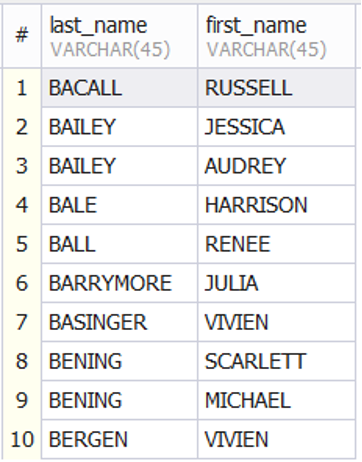
You can have it like this:

The names above are sorted by last_name and first_name. Notice the names with the same last name and you will see the difference in the 2 images.
But that sorts the result set as a whole. Using MySQL ORDER BY in analytical functions sorts by partition, set, or group. Like the ORDER BY for the entire result set, it arranges text alphabetically (or the reverse). Or it arranges numbers in increasing (or decreasing) order. Or dates in chronological order.
Here’s a sample output using the ROW_NUMBER window function with ORDER BY:

You will learn more about this and how to partition your results in the following sections.
MySQL ORDER BY Syntax
You are probably familiar with this syntax:
SELECT <column_list>
FROM <table_name>
ORDER BY <expression> ASC|DESC, [<expression2> ASC|DESC], [<expressionN> ASC|DESC]
[LIMIT rowcount] [OFFSET offset]
It sorts the entire result set using column names or other expressions. Expressions can be a column name used in a function like YEAR(date_column) or UPPER(text_column). ASC and DESC are used to flip the result 180 degrees. It tells you if the order is ascending or descending.
Now, this has a profound effect when limiting results with LIMIT and OFFSET clauses. If ORDER BY uses ascending direction, the result is the first number of rows indicated by LIMIT. And if OFFSET is specified, it starts with the row after the skipped rows. But if ORDER BY is descending, the result returned are the last rows, indicated by LIMIT.
MySQL ORDER BY Syntax in Window Functions
But you can use MySQL ORDER BY in window functions within an OVER clause. But first, let me show you where an OVER clause is used:
SELECT
 <column1>
,<column2>
,<window_function1([expression])> OVER <over_clause> AS <column3>
,<window_functionN([expression])> OVER <over_clause> AS <columnN>
FROM <table_name>
[<join_definition>]
[WHERE <where_clause>]
[WINDOW <window_name1> AS (<over_clause>), <window_nameN> AS (over_clause)]
ORDER BY <expression> ASC|DESC, [<expression2> ASC|DESC], [<expressionN> ASC|DESC]
[LIMIT rowcount] [OFFSET offset]
Where <window_function([expression])> is the window function, like ROW_NUMBER, DENSE_RANK, or others. For a list of MySQL window functions, visit the official documentation.
Meanwhile, <over_clause> is defined as:
OVER ([PARTITION BY <partition_clause>] [ORDER BY <order_by_clause>] [<frame_clause>]) | <window_name> So, there’s your ORDER BY clause inside the OVER clause.
Let’s discuss each part of the <over_clause>:
- PARTITION BY <partition_clause> is optional if you don’t want to partition. This means the window function will use the whole result set. And this is the same as using an aggregate function with or without a GROUP BY clause. But if you will partition, the <partition_clause> can be a column list or an expression. The columns used in the PARTITION BY will be the groups used by the window function.
- ORDER BY <order_by_clause> needs at least 1 column to sort. It is also optional. Some window functions need ORDER BY for the result to make sense. This includes RANK and DENSE_RANK.
- The <frame_clause> defines the subset of the current partition. It is optional. But if you want to do running totals or rolling averages, this is a must.
- Lastly, <window_name> is a name you define for the <over_clause>. If you have the same OVER clause for different columns, you don’t want to repeat typing them. So, use a <window_name> and define the OVER clause once for each column with the same OVER clause.
Meanwhile, WINDOW <window_name> AS (<over_clause>) is where you define the OVER clause for a window name.
Again, the LIMIT and OFFSET clauses will affect what rows are retrieved based on sort order.
MySQL ORDER BY Examples Showing Relevant Sections
To see where all these fit in a SELECT statement, see the 2 images below.
The first use SUM as a window function. Aggregate functions like SUM can be used as a window function if an OVER clause is specified. See below:

Then, the next sample uses different window functions where the OVER clause is defined once. This is also given a window name (w). This is where the window name gets handy. You don’t need to type the OVER clause 6 times. So, the code is shorter. See below:

The above images show the different clauses used with window functions. Let’s examine examples deeper in the next section.
6 MySQL ORDER BY Examples
The 5 examples here will use the following tables and data:
-- Manga sales in Japan for 3 years (2020, 2021, and 2022)
CREATE TABLE manga_sales
(
year smallint,
manga_series varchar(50),
author varchar(20),
publisher varchar(20),
sales int
);

INSERT INTO manga_sales
(year, manga_series, author, publisher, sales)
VALUES
(2021,'Tokyo Revengers','Ken Wakui','Kodansha',24981486),
(2021,'Attack on Titan','Hajime Isayama','Kodansha',7332398),
(2020,'Demon Slayer: Kimetsu no Yaiba','Katsu Aki','Shueisha',82345447),
(2020,'One Piece','Eiichiro Oda','Shueisha',7709667),
(2021,'Jujutsu Kaisen','Gege Akutami','Shueisha',30917746),
(2022,'Tokyo Revengers','Ken Wakui','Kodansha',5087330),
(2021,'Demon Slayer: Kimetsu no Yaiba','Katsu Aki','Shueisha',29511021),
(2021,'My Hero Academia','Kōhei Horikoshi','Shueisha',7020361),
(2022,'SpyXFamily','Tatsuya Endo','Shueisha',10389874),
(2022,'One Piece','Eiichiro Oda','Shueisha',7540102),
(2020,'Haikyu!!','Haruichi Furudate','Shueisha',7212099),
(2020,'Jujutsu Kaisen','Gege Akutami','Shueisha',6702736),
(2022,'Jujutsu Kaisen','Gege Akutami','Shueisha',6235327),
(2022,'My Hero Academia','Kōhei Horikoshi','Shueisha',2375796),
(2020,'Kingdom','Yasuhisa Hara','Shueisha',8251058);

-- Bank transactions
CREATE TABLE transactions
(
account_number varchar(12),
transaction_date date,
description varchar(50),
amount decimal(10,2)
);

INSERT INTO transactions
(account_number, transaction_date, description, amount)
VALUES
('987432010211','2022-12-01','Deposit',10000.00),
('987432010212','2022-12-01','Deposit',1000.00),
('987432010211','2022-12-03','Deposit',15200.00),
('987432010211','2022-12-04','Withdrawal',-1000.00),
('987432010212','2022-12-02','Credit Adjustment',3400.00),
('987432010211','2022-12-05','Debit Adjustment',-1000.00),
('987432010212','2022-12-10','Deposit',51000.00),
('987432010212','2022-12-20','Withdrawal',-1000.00),
('987432010211','2022-12-11','Deposit',1000.00),
('987432010211','2022-12-18','Withdrawal',-1000.00);
We will also use the Payment table in the Sakila sample database.
And to be clear, the MySQL version I used is 9.1 running on Ubuntu. You can see yours using SELECT VERSION(). And the GUI tool I used is dbForge Studio for MySQL Enterprise Edition. It helps me get productive in SQL coding and produce high-performing queries. If you tried the examples here and it’s not the same or produces an error, make sure the MySQL version is the same as mine.

Example 1: Add a Row Number in the Result Set
The example below uses the ROW_NUMBER window function without a partition. This means rows are numbered for the whole result set. But an ORDER BY is specified which will sort the results based on the highest to lowest manga sales.
SELECT
year,
manga_series,
author,
publisher,
sales,
ROW_NUMBER() OVER(ORDER BY sales DESC) AS row_num_no_partition
FROM manga_sales;
See the output below:

If you remove the ORDER BY clause, the output is how it is stored in the table. Or based on the sequence done in the INSERT statement earlier.
Example 2: Add Row Numbers Per Partition
The code below further enhances the previous example with PARTITION BY year. This makes more sense than the previous example.
SELECT
year,
manga_series,
author,
publisher,
sales,
ROW_NUMBER() OVER(PARTITION BY year ORDER BY sales) AS row_num_partition_by_year_sorted
FROM manga_sales;
See the output below:

Rows are numbered per year. It resets to 1 every year from 2020 to 2022. Sorting is also from lowest to highest sales. Now, if you make it descending, the result is the same as the image in the first section (What is MySQL ORDER BY?). The sort order flipped to which row is #1.
Example 3: Ranking by Partition Using RANK and DENSE_RANK
In this example, we will rank the results by year starting with the highest sales. To see how RANK and DENSE_RANK work with equal figures, we need to round the sales figures. Here it is:
SELECT
year,
manga_series,
author,
publisher,
ROUND(sales,-6) AS rounded_sales,
RANK() OVER w AS series_rank,
DENSE_RANK() OVER w AS series_dense_rank
FROM manga_sales
WINDOW w AS (PARTITION BY year ORDER BY ROUND(sales,-6) DESC);
And here’s the result:
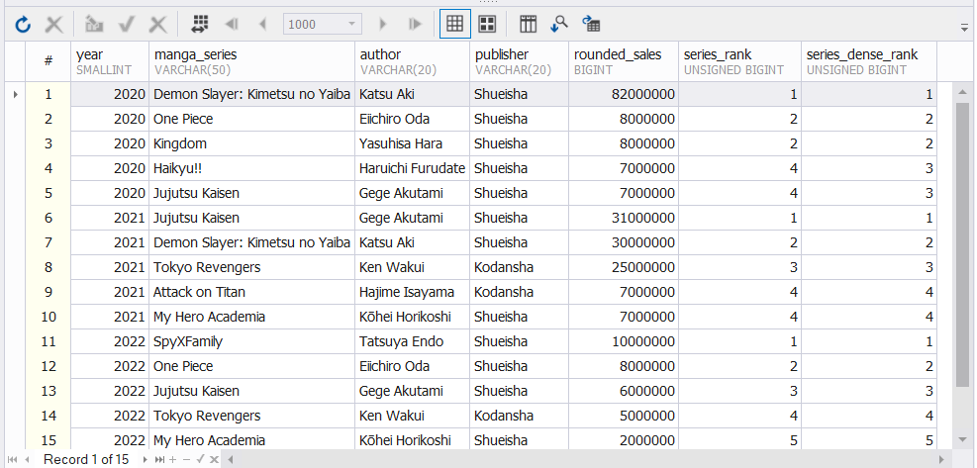
From the above, the manga sales are ranked per year based on the highest sales. Note that there are ties in the sales figures. With RANK, the ranking has gaps. So, 4 comes after 2 in the year 2020. But with DENSE_RANK, the ranking has no gaps. So, the outcome is up to the third rank only. It’s different in 2022. There are no ties. So, there are 5 ranks.
Note that the ORDER BY clause is required to produce this output. Try removing it and all the ranking values become 1. And it will make no sense.
Example 4: Getting the Top Performer and the Runner Up
The example below will get the top-ranking manga series and the runner-up per year based on sales. It will also use a window name to avoid repeating the same OVER clause. And the ORDER BY clause is important for sorting to get the top performer and the runner-up
WITH top_series AS
(
SELECT DISTINCT
year
,FIRST_VALUE(manga_series) OVER w AS top_manga_series
,NTH_VALUE(manga_series,2) OVER w AS runner_up
FROM manga_sales
WINDOW w AS (PARTITION BY year ORDER BY sales DESC)
)
SELECT
year, top_manga_series, runner_up
FROM top_series
WHERE runner_up is NOT NULL;
And here’s the output:
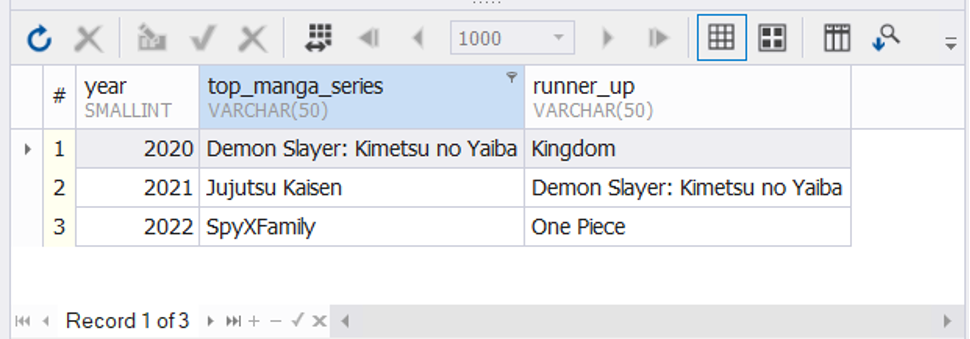
The window functions are inside a CTE. Why? Because 6 records will appear if you only run this:
SELECT DISTINCT
year
,FIRST_VALUE(manga_series) OVER w AS top_manga_series
,NTH_VALUE(manga_series,2) OVER w AS runner_up
FROM manga_sales
WINDOW w AS (PARTITION BY year ORDER BY sales DESC)
And 3 of them will have a NULL runner-up like this:
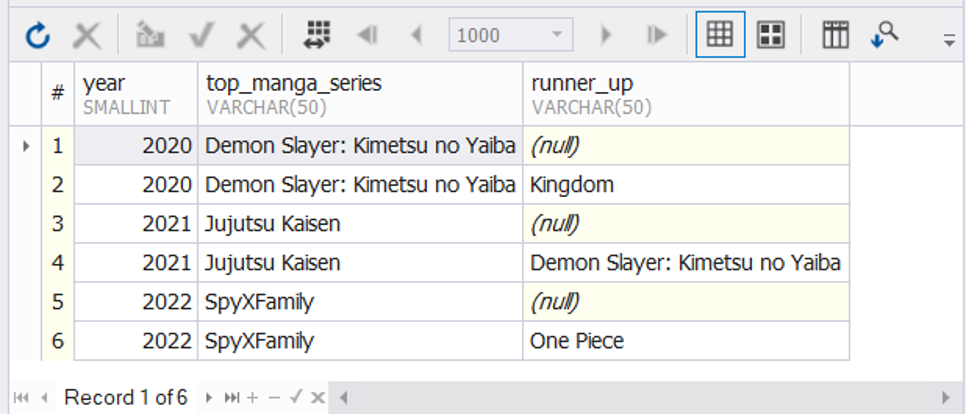
So, the CTE will give the above result. But the query to the CTE will filter the result and remove the nulls (WHERE runner_up IS NOT NULL).
And because this will throw an error:

And this:

Example 5: Running Totals Using Frame Clause
This will use the second table and display the running totals of a bank account transaction. The ORDER BY clause is responsible to make the result chronological. Here’s the code:
SELECT
account_number
,transaction_date
,description
,amount
,SUM(amount) OVER(PARTITION BY account_number ORDER BY transaction_date
ROWS UNBOUNDED PRECEDING) AS running_total
FROM transactions;
And here’s the output:
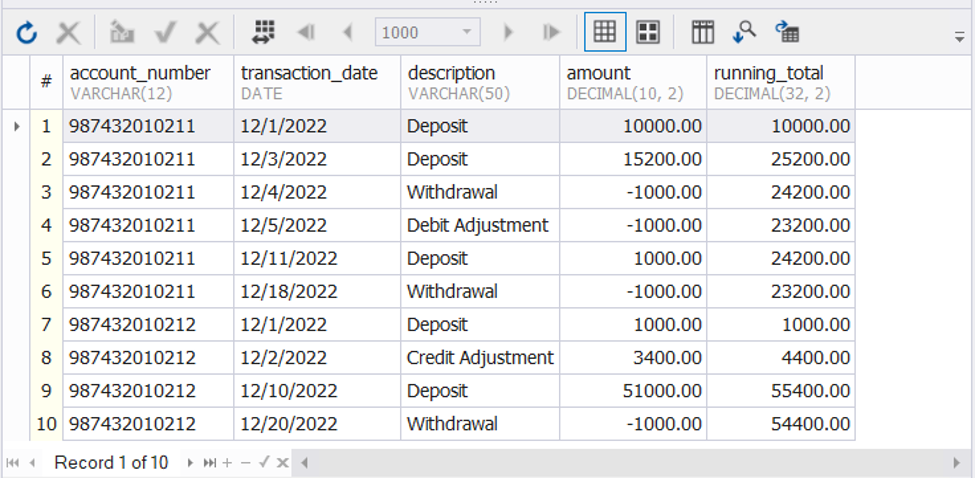
The frame clause ROWS UNBOUNDED PRECEDING made this possible. For more details on frame clauses, check this out.
Example 6: Using ORDER BY with LIMIT
The following example will show the effects of LIMIT when we reverse the sort order with DESC. First, here’s the code with an ascending sort order:
SELECT
p.payment_id
,p.customer_id
,p.payment_date
,p.amount
,LAG(p.amount, 1) OVER (ORDER BY p.customer_id, p.payment_date, p.payment_id ASC) prev_date_payment
FROM sakila.payment p
LIMIT 10;
The code above uses the LAG window function. It will give the payment amount of the previous row. Here’s the result:
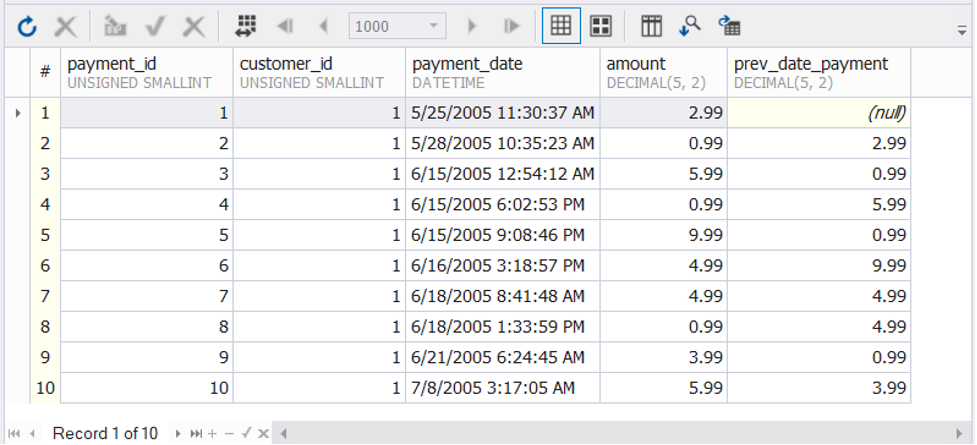
Notice the chronological order based on the payment date. Note the values.
Then, let’s try changing the sort order to descending:
SELECT
p.payment_id
,p.customer_id
,p.payment_date
,p.amount
,LAG(p.amount, 1) OVER (ORDER BY p.customer_id, p.payment_date, p.payment_id DESC) prev_date_payment
FROM sakila.payment p
LIMIT 10;
And here’s the result:
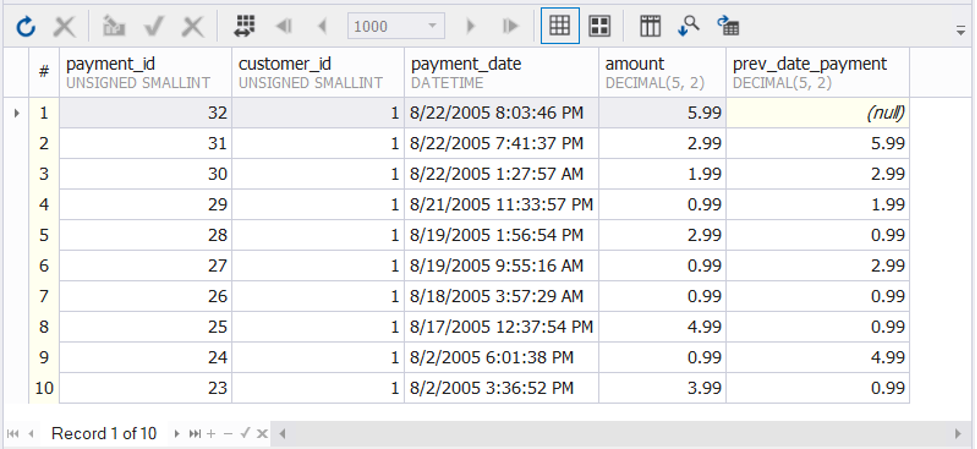
Notice the payment dates? It’s totally different from the previous result.
Here’s what happened.
First, the ascending order. The image below illustrates how MySQL retrieved the first 10 rows out of the thousands. It follows the ascending order based on customer id and payment date. Since customer id 1 is the first customer, that’s what we got (The table has more than 500 customer IDs). Customer id 1 has 32 records from May to August. We only took 10 rows from that.

When we changed the order to descending, customer id 1 is still the first on the list. The customer id is still in ascending order. But the payment date is now in descending order. So, MySQL took the last 10 payments based on the payment date. So, to illustrate, this is what happened:

The May to July payments do not qualify for the LIMIT 10 rows. That’s why the result was very different. So, you should be careful and be sure to control this moment when using ORDER BY with LIMIT.
Conclusion
That’s it.
The MySQL ORDER BY clause in analytical or window functions is for sorting out row groups. You can follow the same concepts from the 6 examples we have in your reports when applicable.